About Us
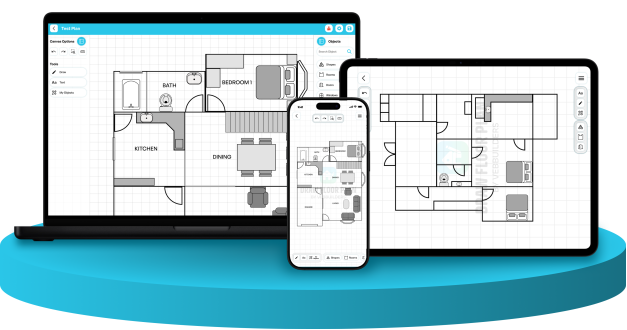
Draw Floor Plan was created with a simple goal: make floor planning accessible to everyone, regardless of experience, profession, or device.
Many floor planning tools are designed for specialists and often require expensive software, complex workflows, or powerful computers. We believed there should be a better way - a tool that allows anyone to sketch, plan, and visualize spaces quickly and easily.
Whether you're redesigning a room, planning a renovation, arranging furniture, creating property layouts, or simply exploring ideas, Draw Floor Plan provides an intuitive environment that helps bring those ideas to life.
Today, Draw Floor Plan is available across mobile, tablet, and web platforms, helping users create floor plans wherever inspiration strikes.
WHY WE BUILT IT
When we looked at existing floor planning software, we noticed a common challenge: many tools were built for professionals but felt overwhelming for everyone else. Complex interfaces, steep learning curves, expensive subscriptions, and desktop-only workflows often made simple planning tasks unnecessarily difficult.
We believed floor planning should be something anyone could do. Whether you're rearranging furniture in a living room, planning a home renovation, designing a new property layout, or sketching ideas for a future project, creating a floor plan shouldn't require specialized training or complicated software.
That idea became the foundation of Draw Floor Plan.
Our goal was to create a platform that combines simplicity with flexibility. Users can start with a blank canvas, quickly sketch layouts, place rooms and objects, customize plans, and make precise adjustments—all from a device they already use every day.
Today, Draw Floor Plan is available across mobile, tablet, and web platforms, allowing users to work wherever inspiration strikes. As the platform continues to evolve, our mission remains the same: make floor planning more accessible, more intuitive, and more enjoyable for everyone.
Growing with a Global Community
Since its launch, Draw Floor Plan has grown into a platform used by thousands of people across the world.
The app has helped users create room layouts, furniture arrangements, renovation concepts, residential plans, and commercial space designs from virtually every region of the globe.

OUR REACH

0+
Spanning 185 out of the 195 nations on Earth. We are connecting a truly worldwide network of planners, designers, and homeowners.

0+
Reaching every corner of the world, from dense urban centers to remote communities, making professional floor planning accessible globally.

0+
More than 35,000 people rely on Draw Floor Plan for their planning and design needs, spanning diverse backgrounds, roles, and regions.

0+
From spark to blueprint. Our community has generated tens of thousands of unique designs, turning raw imagination into tangible spaces.